

PunchOut integrations for SME procurement in 2026
More and more large clients expect their suppliers to appear directly within their procurement system as a clickable catalog—within SAP Ariba, Coupa, or Dynamics 365—rather than just as a name on a supplier list. For SME manufacturers and wholesalers working with these clients, a PunchOut solution has therefore become a prerequisite for retaining contracts.
2026 makes this even more urgent. From January 1st, electronic invoicing via Peppol will be mandatory between Belgian VAT-registered businesses, and large purchasing organizations are simultaneously continuing to digitize their own e-procurement. Both trends point in the same direction: order and invoice data must flow in a structured way from system to system, without PDFs, emails, or manual retyping. Suppliers who are already PunchOut-ready have a head start.
This guide explains how PunchOut integrations with B2B procurement platforms work, what requirements SMEs must meet to offer them, and which integration pitfalls most frequently cause delays or rejected connections.
What exactly is a PunchOut integration?
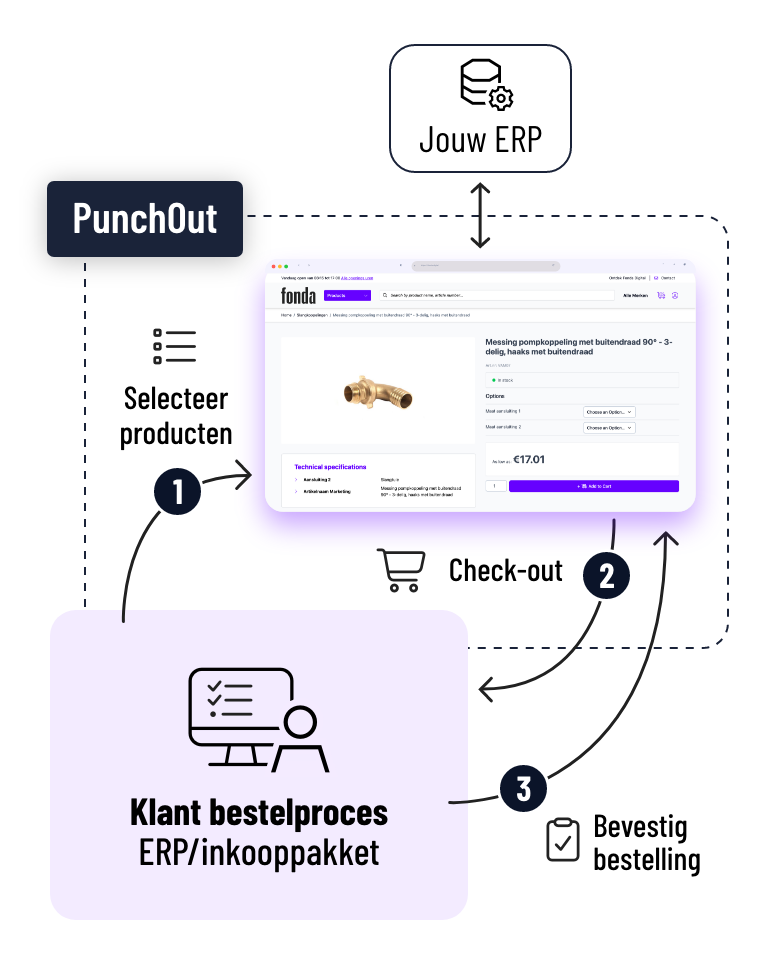
PunchOut is a technology that connects a supplier's webshop directly to the client's procurement system. The buyer opens their own procurement platform, clicks on the supplier's name, and is automatically taken to a session in the supplier's webshop where only the agreed-upon products and prices are visible.
The buyer shops there just like in any online catalog: searching, filtering, and adding products to a shopping cart. As soon as they finish, the webshop sends that cart back to the procurement system. There, the order goes through the standard approval process without anyone having to manually retype an item number, price, or quantity.
For the buyer, this feels like shopping within their trusted system. For the supplier, it means every order arrives digitally, error-free, and ready for immediate processing.
Why PunchOut solutions carry more weight in 2026
Three developments are pushing PunchOut from a "nice to have" to a requirement for SMEs working with larger clients or government contracts.
The e-invoicing obligation via Peppol. From January 1, 2026, all B2B invoices between Belgian VAT-registered businesses must be electronic, with fines of up to 5,000 euros for repeated violations. Peppol handles the invoicing side, while PunchOut handles the ordering side, but both are built on the same underlying logic: structured data that travels automatically between systems. A supplier who already has their product data and order flow in order via PunchOut does not need to lay a new foundation for Peppol.
Tenders and framework agreements are increasingly demanding it. Government agencies and large industrial clients are making a functional PunchOut connection a standard supplier requirement. Without that connection, you are disqualified before the substantive evaluation even begins.
Procurement departments are focusing on purchasing automation. The easier it is to order from a supplier within one's own system, the greater the chance that the supplier becomes the go-to choice for similar purchases. Conversely, suppliers without a digital connection gradually disappear from the buyer's view.
Which B2B procurement platforms should you be able to support as a supplier?
Most clients work with one of a limited number of major systems: SAP Ariba, Coupa, Oracle Fusion (Procurement Cloud), Microsoft Dynamics 365 Finance & Operations, JAGGAER, Basware, Ivalua, or Synertrade. Anyone who works regularly with tenders or large industrial clients will sooner or later encounter one or more of these names.
You don't need to guess in advance which platform your next client will use. A good integration with procurement platforms supports the two underlying standards and thus covers virtually every procurement system on the market.
OCI or cXML: which standard do you need?
PunchOut operates via two protocols that determine how data travels between the webshop and the procurement system.
OCI (Open Catalog Interface) is the standard within SAP environments. It determines how item numbers, descriptions, prices, and units are returned to the procurement system after a session in the webshop.
cXML (Commerce eXtensible Markup Language) is the XML protocol behind Ariba and most non-SAP platforms. cXML handles both the initiation of the session (PunchOutSetupRequest) and the feedback of the filled shopping cart (PunchOutOrderMessage).
An SME working with various clients usually does not know in advance which standard the next client will expect. Supporting both protocols is therefore the baseline, not an extra.
Requirements for a working PunchOut solution
Setting up a PunchOut connection is not just about the technical protocol. Five things must be in order for the integration to hold up in practice.
Structured product data. Item numbers, descriptions, units, and technical specifications must be consistent and complete. Incomplete or duplicate product data leads to incorrect orders on the customer's side, which quickly undermines trust in the connection.
Real-time pricing and inventory. The customer must see the exact contract price and current availability agreed upon with them. A nightly export lags too far behind reality; this requires a direct connection to your ERP.
Customer- and catalog-specific sessions. Every PunchOut session must display the correct contract prices and the right assortment for that specific customer, configured based on the agreements you have with them.
Secure session setup. Every session starts via a unique token generated by the customer's procurement system. No shared passwords, sessions that expire automatically, data transfer via HTTPS.
A testing phase before go-live. The customer's IT department typically tests the connection in a sandbox environment before it goes live. A supplier that cannot provide a test environment slows down the entire project.
Six integration pitfalls that SMEs should avoid
- Providing incomplete or inconsistent product data. If item numbers, units, or translations are incorrect, the buyer will see wrong or incomplete information in their own system. Fix this before you start the PunchOut integration, not after.
- Working with a price list that is not real-time. A price that changes in the ERP today but doesn't update in the PunchOut session until tomorrow leads to disputes during order approval.
- Showing one generic catalog to all customers. Without customer-specific assortments and pricing, you lose the very advantage PunchOut is supposed to offer: a session that feels tailored to that specific buyer.
- Supporting only one standard. Anyone offering only cXML will be disqualified by any customer expecting OCI, and vice versa. Always ask a new customer which protocol and procurement system they use before setting up the connection.
- Not providing a test environment for the customer's IT department. Without a sandbox, the customer has to test directly in production, which almost no IT department will allow. That delays delivery by weeks.
- Treating PunchOut as a one-off project. A connection that works at launch can still break after a product update, price change, or ERP upgrade. Designate someone to monitor the connection and quickly follow up on customer complaints.
Step-by-step plan: how to set up a PunchOut integration
- Inventory which procurement system and standard your customer uses. Ask this directly to the procurement or IT department.
- Get your product data in order. Item numbers, descriptions, and units must be consistent and complete in your PIM or ERP.
- Connect your webshop to your ERP in real-time for pricing, inventory, and customer-specific agreements.
- Configure the PunchOut session with the correct protocol (OCI or cXML) and test it together with the customer's IT department in a sandbox environment.
- Go live and track your first orders to quickly detect discrepancies between what the customer sees and what your ERP records.
With standard connectors and a structured process, a PunchOut integration is typically operational within two to four weeks, depending on how quickly the customer's IT department can move.
Frequently asked questions about PunchOut solutions
What is the difference between PunchOut and an EDI connection?
EDI exchanges fixed documents such as orders, invoices, and delivery confirmations between two systems. PunchOut allows the buyer to shop interactively in the supplier's catalog, with real-time pricing and availability, from within their own procurement system. Both technologies complement each other and can coexist.
Does my customer need to install anything to order via PunchOut?
No. The connection is set up at the level of the customer's procurement system. Once active, any user of that system can shop directly in the supplier's webshop without any additional software.
Which procurement platforms should I be able to support as an SME?
The most widely used B2B procurement platforms are SAP Ariba, Coupa, Oracle Fusion, Microsoft Dynamics 365, JAGGAER, Basware, Ivalua, and Synertrade. A PunchOut solution that supports both OCI and cXML covers virtually all of these systems.
Is PunchOut mandatory for participating in tenders?
Increasingly, yes. Government agencies and large industrial customers often include a functional PunchOut connection as a supplier requirement in tenders and framework agreements. In some cases, you won't even be eligible without it.
Does the mandatory e-invoicing via Peppol in 2026 impact my PunchOut integration?
Not directly: Peppol handles the invoice, PunchOut handles the order, and they are separate standards. Indirectly, yes, because both require your product data, prices, and order data to be structured and up-to-date in your systems. Anyone who already has that in order for PunchOut is well on their way for Peppol.
Can I show a different catalog or price per customer via PunchOut?
Yes. A good PunchOut solution automatically displays the contract prices, permitted assortment, or specific item list agreed upon with that customer as soon as the session starts for the logged-in user.
How long does it take to implement a PunchOut integration?
With standard connectors and structured product data, two to four weeks is realistic, depending on how quickly the customer's IT department tests and approves the connection.
Let your customers order via PunchOut
Fonda offers a PunchOut integration that allows your business customers to connect directly via their eProcurement environment.
Start with the basics.
Build from there.
Fonda Basic is free and immediately gives you a central place for all your product data and digital assets. You can take the step to a complete B2B webshop with customer-specific prices when you are ready.
Specifically built for B2B SMEs with 20–300 employees · Support based in Ghent